Every member of an organization has a role. It defines what the person can do in HubNext in general. Access to a specific project is configured separately — see Project access.
Where your role comes from
An administrator assigns your role when adding you to the organization. If you lack permissions — for example, you need to create a project — contact your manager or administrator.
What each role can do
User
- Sees the organization's public projects and the projects they've been granted access to.
- Creates tasks, comments, changes status and assignee, keeps checklists and logs time.
- Reads and edits the project's doc pages, keeps data tables, links tasks as duplicates.
- Sorts their own tasks into personal stacks (Tasks → Dashboard → Stacks).
- Keeps personal Todos and Favorites, sets up their profile and notifications.
Manager
Everything a user can do, plus:
- Creates projects. Only users with elevated permissions — managers and administrators — can create projects.
- Edits public projects: subprojects and project settings, imports tasks, moves them between projects, manages auto-close.
- Sees all active projects of the organization on the dashboard.
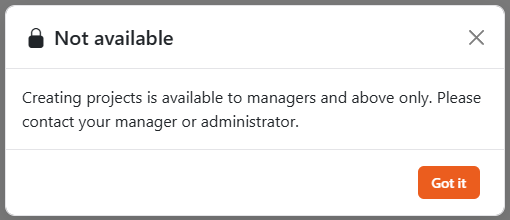
If a user without elevated permissions clicks New project, they see the Not available window suggesting they contact their manager or administrator.
Head
The head of the organization: everything a manager can do, plus sets up SLA — the reaction and resolution time of tasks. Sits between manager and administrator.
Administrator
Everything a manager can do, plus:
- Full access to all projects in the organization, including private ones.
- Writes and sees private comments on tasks.
- Can change the description of any task. Others can only change the description of tasks they created.
- Deletes leads and deals in CRM and deletes other people's tags.
Reports (view only)
A special role for people who only need reports: only the Reports section and their own profile are available. Tasks, projects, todos and CRM are not.
Guest
An outside person invited to a guest project. Sees only this project: Dashboard, Kanban and its tasks, and works with them like a regular user. Everything else is closed. More in Guest projects.
Role and project access
The role works together with project access:
- The project owner has full access to it regardless of role.
- Users and managers get into a private project only if they're granted access: view, edit or manage.
- Anyone with manage permission in a project can grant access on its Access tab.
You can't open a task from a project you have no access to — not even via a direct link. Ask the project owner or an administrator to grant you access.