HubNext is a workspace for your team: tasks and projects, personal todos, project documentation and CRM in one place. This article explains how it all fits together and where to start.
How it's organized
- Organization — your company in HubNext. Everything you see belongs to the current organization. Its name is shown in the top-left corner under the logo.
- Projects — major areas of work inside the organization. A project can be split into subprojects, e.g. "Mobile app" → Android, iOS, Backend API.
- Tasks — concrete pieces of work with an assignee, status, due date and comments. Every task lives in a project and, optionally, in a subproject.
- Pages — the project's knowledge base pages: requirements, instructions, agreements. They are on the Pages tab inside a project.
- Todos — your personal list for the day, separate from team tasks.
- CRM — clients, leads, deals and products. The section is available if it's enabled for your organization.
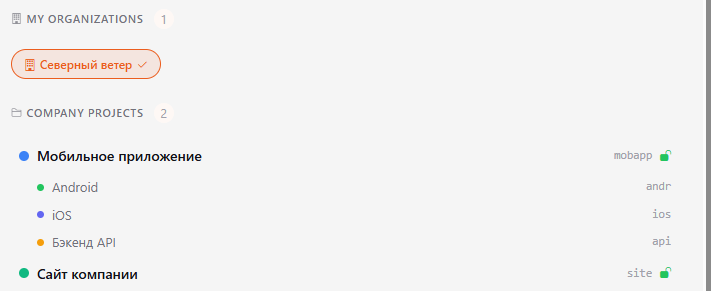
On the Tasks dashboard, the Company projects block on the right lists the projects and subprojects you have access to.
Where to start
- Sign in, or register and join your organization — Sign in, registration and password.
- Get to know the interface — Interface and navigation.
- Find out what your role allows — Roles and permissions.
- Open Sidebar → Tasks: the dashboard collects tasks assigned to you and tasks you gave to others — Kanban and dashboard.
- Create your first task — Creating a task — and get familiar with the task page — Task page.
- Look through the projects you work in — Projects — and their documentation — Project pages.
- Set up notifications so you don't miss anything — Notifications.
Help opens in a separate tab — the Help item in the sidebar. Keep it handy while you're getting started.