A subproject is a part of a project: a module, an area or a stage. For example, the "Mobile app" project may have "iOS", "Android" and "Backend API" subprojects. You can spread tasks across subprojects and look at each part separately.
Where to find it
Open a project, the Subprojects tab. Click a subproject to open its page with the Tasks, Activity and Access tabs.
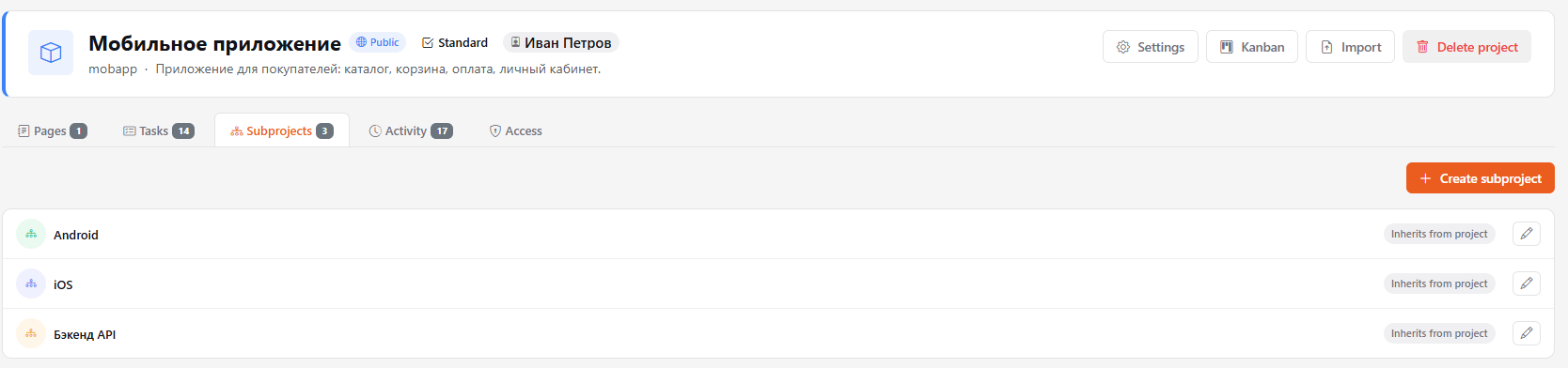
How to create a subproject
Anyone who can edit the project can create subprojects.
- On the Subprojects tab, click Create subproject.
- Enter a name, and optionally a description and color.
- Choose the access: Inherits from project or Custom access (see below).
- Click Save.
You can also create a subproject right from a task card — with + Create subproject in the subproject picker.
Status and dates
A subproject can have a status — Not started, In progress, Paused, Pilot, Live, Cancelled — and start and end dates. It's optional, but it helps to see what stage each part of the project is at. Change them with the pencil in the subproject list.
Subproject access
- Inherits from project — everyone with access to the project sees the subproject. Fits most cases.
- Custom access — project access is checked first, then the subproject's own rights. This way you can hide, for example, a finance subproject from part of the team. Rights are granted on the subproject's Access tab, the same way as for a project.
Only the system administrator can delete a subproject, and only if it has no tasks.