The same client or lead is often created twice: by different managers, from an import or from a form. The Duplicates section finds such pairs and lets you merge them into one record without losing deals, contacts, files and correspondence.
Where to find it
Sidebar → Deals → Duplicates. The section is visible to managers and above, and only an administrator can merge records. The Clients and Leads tabs show separate lists; next to the title is the number of groups found.
How duplicates are found
Records land in one group if at least one of these matches:
- Email — ignoring case and spaces;
- Phone — by the last 10 digits, so
+7 (701) 555-12-34and8 701 555 12 34count as the same number; - Name — without legal forms (LLC, Ltd and the like) and punctuation, Cyrillic and Latin alike: "ТОО Альфа Трейд" and "Alfa Treyd LLC". For clients the full legal name is compared too.
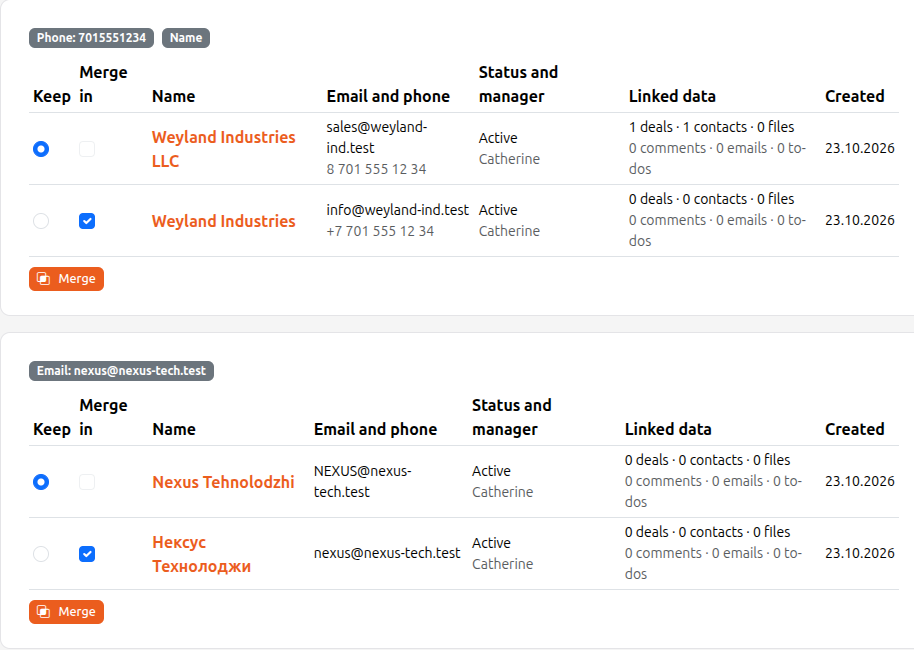
Chained matches count as well: if A looks like B by email and B like C by phone, all three end up in one group. The reasons are shown as badges above the group. Names that are too short and empty fields are not signs.
How to merge
- Open the group. For every record you see the contacts, status, manager and linked data: how many deals, contacts, files, comments, emails and to-dos.
- In the Keep column the recommended record is selected — the one with more data. Choose another if needed.
- In the Merge in column tick the records to merge into the one you keep.
- Click Merge and confirm. This cannot be undone.
What happens: deals, contacts, files, comments, to-dos, mailing emails, tags, products, watchers and history move to the record you keep; its empty fields (phone, email, manager, full name, fields from Details) are filled from the merged record while filled ones stay as they are. Manual audience lists and scenario steps that used the merged record are pointed at the kept one. The merged record is deleted and the kept one gets a "merged with a duplicate" entry in Activity with the name of the deleted record.
A lead that has already become a client cannot be merged: merge the clients instead. If a step fails, nothing changes: the merge is done entirely or not at all.